Find, edit, test and publish the workflows you’ve saved.
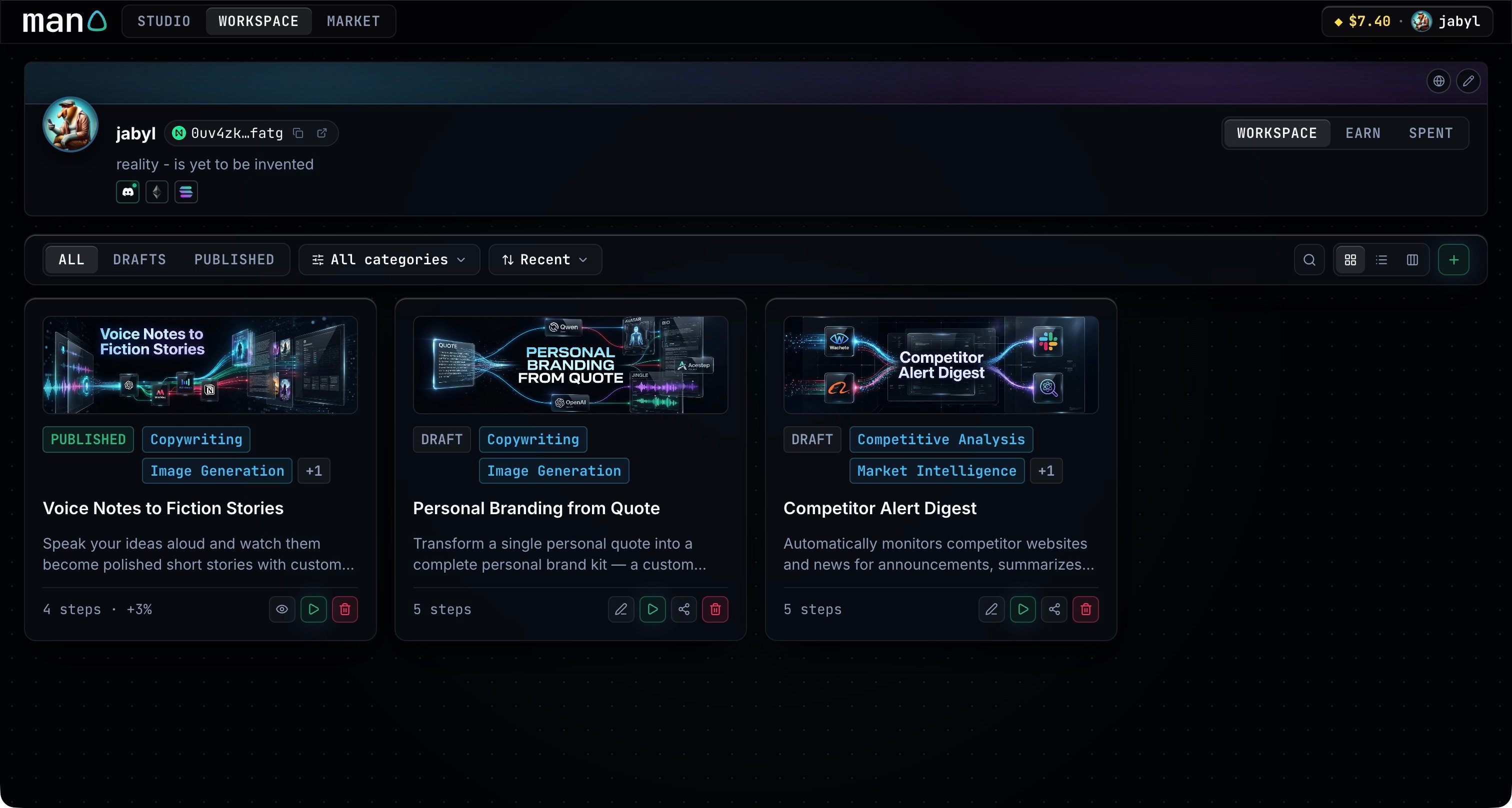
Workspace holds your saved drafts and published workflows. Use All, Drafts or Published to choose what you see.Search by name, filter by category, or change the sort order. The view controls switch between Cards, List and Columns.Each workflow shows its status, categories and step count. Use its controls to:
Edit the workflow in Studio.
Run it with new input or open one of your saved conversations.
Publish a draft after reviewing its details and creator fee.
Delete a workflow you no longer want.
Your drafts stay in Workspace until you publish them. Select Earn to inspect your workflows’ activity and royalties, or Spent to review your model usage and payments.
{"docsConfig":{"theme":"mint","$schema":"https://mintlify.com/docs.json","name":"man0","colors":{"primary":"#38bdf8","light":"#38bdf8","dark":"#38bdf8"},"logo":{"light":"https://mintcdn.com/frswdefsf/RpCjAbmgwslrQ5q4/branding/logo.svg?fit=max\u0026auto=format\u0026n=RpCjAbmgwslrQ5q4\u0026q=85\u0026s=73b534ffe0673dd29c241a96a324d889","dark":"https://mintcdn.com/frswdefsf/RpCjAbmgwslrQ5q4/branding/logo.svg?fit=max\u0026auto=format\u0026n=RpCjAbmgwslrQ5q4\u0026q=85\u0026s=73b534ffe0673dd29c241a96a324d889","href":"https://app.man0.space"},"favicon":"https://mintcdn.com/frswdefsf/RpCjAbmgwslrQ5q4/branding/favicon.ico?fit=max\u0026auto=format\u0026n=RpCjAbmgwslrQ5q4\u0026q=85\u0026s=7327c21c02f213e74205a9c46522a814","api":{"playground":{"display":"simple"},"examples":{"autogenerate":false}},"appearance":{"default":"dark","strict":true},"background":{"color":{"light":"#020305","dark":"#020305"}},"navbar":{"links":[{"href":"https://github.com/man0-space","type":"github"}],"primary":{"type":"button","label":"Open Man0","href":"https://app.man0.space"}},"footer":{"socials":{"github":"https://github.com/man0-space"}},"search":{"prompt":"Search Man0"},"fonts":{"heading":{"family":"Inter","weight":650,"source":"fonts/inter.woff2","format":"woff2"},"body":{"family":"Inter","weight":400,"source":"fonts/inter.woff2","format":"woff2"}},"contextual":{"options":["copy","view"],"display":"header"},"styling":{"latex":true},"navigation":{"pages":[]}},"deployment":{"deploymentMetadataValue":{"subdomain":"frswdefsf","hasAudioNarration":false,"actualSubdomain":"frswdefsf","customDomains":["docs.man0.space"],"gitSource":{"type":"github","owner":"man0-space","repo":"docs","deployBranch":"main","contentDirectory":"","isPrivate":false,"mountPath":"","label":"","_id":"6af8e21f9033d7e87e888707"},"entitlements":{},"buildId":"6af8e3189033d7e87e888eaf","clientVersion":"0.0.4143","searchFilterCounts":[{"language":"default","tag":"Endpoints","count":59},{"language":"default","tag":"App","count":15},{"language":"default","tag":"Workflows","count":12},{"language":"default","tag":"NEAR","count":12},{"language":"default","tag":"AI \u0026 workflows","count":12},{"language":"default","tag":"Developer","count":10},{"language":"default","tag":"Accounts","count":9},{"language":"default","tag":"Execution","count":9},{"language":"default","tag":"Authentication","count":8},{"language":"default","tag":"Build and run","count":6}]},"assistantConfig":{"enableAskAiButton":false,"enableStarterQuestions":false,"enableContextualStarterQuestions":false,"enableAskAiSearchBar":true},"basePath":"","hasChatPermissions":false,"hasWebMcpPermissions":false,"toggles":[{"name":"kill-isr","enabled":true,"variant":{"name":"disabled","enabled":false,"feature_enabled":true},"impressionData":false},{"name":"custom-rbac-roles","enabled":true,"variant":{"name":"disabled","enabled":false,"feature_enabled":true},"impressionData":false},{"name":"agent-mintlify-slack","enabled":true,"variant":{"name":"disabled","enabled":false,"feature_enabled":true},"impressionData":false},{"name":"agent-integrations-settings","enabled":true,"variant":{"name":"disabled","enabled":false,"feature_enabled":true},"impressionData":false},{"name":"rbac-expansion","enabled":true,"variant":{"name":"disabled","enabled":false,"feature_enabled":true},"impressionData":false},{"name":"automations-pr-grouping","enabled":true,"variant":{"name":"disabled","enabled":false,"feature_enabled":true},"impressionData":false},{"name":"custom-prefix","enabled":true,"variant":{"name":"disabled","enabled":false,"feature_enabled":true},"impressionData":false},{"name":"analytics-v7","enabled":true,"variant":{"name":"disabled","enabled":false,"feature_enabled":true},"impressionData":false},{"name":"user-flows-analytics","enabled":true,"variant":{"name":"disabled","enabled":false,"feature_enabled":true},"impressionData":false},{"name":"no-publish-flow","enabled":true,"variant":{"name":"disabled","enabled":false,"feature_enabled":true},"impressionData":false},{"name":"workos-onboarding","enabled":true,"variant":{"name":"disabled","enabled":false,"feature_enabled":true},"impressionData":false},{"name":"snapshot-serving-live","enabled":true,"variant":{"name":"disabled","enabled":false,"feature_enabled":true},"impressionData":false},{"name":"stripTemperatureMiddleware","enabled":true,"variant":{"name":"disabled","enabled":false,"feature_enabled":true},"impressionData":false},{"name":"support-platform-pylon-zendesk","enabled":true,"variant":{"name":"disabled","enabled":false,"feature_enabled":true},"impressionData":false},{"name":"snapshot-serving","enabled":true,"variant":{"name":"disabled","enabled":false,"feature_enabled":true},"impressionData":false},{"name":"instant-rollback","enabled":true,"variant":{"name":"disabled","enabled":false,"feature_enabled":true},"impressionData":false},{"name":"granular-notifications-server","enabled":true,"variant":{"name":"disabled","enabled":false,"feature_enabled":true},"impressionData":false},{"name":"granular-notifications","enabled":true,"variant":{"name":"disabled","enabled":false,"feature_enabled":true},"impressionData":false},{"name":"automations-fable","enabled":true,"variant":{"name":"disabled","enabled":false,"feature_enabled":true},"impressionData":false},{"name":"fixed-ai-action-pricing","enabled":true,"variant":{"name":"disabled","enabled":false,"feature_enabled":true},"impressionData":false},{"name":"automation-resolve-merge-conflict","enabled":true,"variant":{"name":"disabled","enabled":false,"feature_enabled":true},"impressionData":false},{"name":"scoped-publishing","enabled":true,"variant":{"name":"disabled","enabled":false,"feature_enabled":true},"impressionData":false},{"name":"mintql","enabled":true,"variant":{"name":"disabled","enabled":false,"feature_enabled":true},"impressionData":false},{"name":"page-level-analytics","enabled":true,"variant":{"name":"disabled","enabled":false,"feature_enabled":true},"impressionData":false},{"name":"editor-version-history-v2","enabled":true,"variant":{"name":"disabled","enabled":false,"feature_enabled":true},"impressionData":false},{"name":"billing-page-v2","enabled":true,"variant":{"name":"disabled","enabled":false,"feature_enabled":true},"impressionData":false},{"name":"full-page-search","enabled":true,"variant":{"name":"disabled","enabled":false,"feature_enabled":true},"impressionData":false},{"name":"workspace-projects","enabled":true,"variant":{"name":"disabled","enabled":false,"feature_enabled":true},"impressionData":false},{"name":"assistant-v5","enabled":true,"variant":{"name":"disabled","enabled":false,"feature_enabled":true},"impressionData":false},{"name":"fork-pr-previews","enabled":true,"variant":{"name":"disabled","enabled":false,"feature_enabled":true},"impressionData":false},{"name":"revalidation-jwt","enabled":true,"variant":{"name":"disabled","enabled":false,"feature_enabled":true},"impressionData":false},{"name":"workos-sso-scim","enabled":true,"variant":{"name":"disabled","enabled":false,"feature_enabled":true},"impressionData":false},{"name":"hobby-abuse-scan","enabled":true,"variant":{"name":"disabled","enabled":false,"feature_enabled":true},"impressionData":false},{"name":"dashboard-inbox","enabled":true,"variant":{"name":"disabled","enabled":false,"feature_enabled":true},"impressionData":false},{"name":"workos-signup","enabled":true,"variant":{"name":"disabled","enabled":false,"feature_enabled":true},"impressionData":false},{"name":"turbopuffer-dual-write","enabled":true,"variant":{"name":"disabled","enabled":false,"feature_enabled":true},"impressionData":false},{"name":"workos-enabled","enabled":true,"variant":{"name":"disabled","enabled":false,"feature_enabled":true},"impressionData":false},{"name":"approve-review-flow","enabled":true,"variant":{"name":"disabled","enabled":false,"feature_enabled":true},"impressionData":false},{"name":"editor-metadata","enabled":true,"variant":{"name":"disabled","enabled":false,"feature_enabled":true},"impressionData":false},{"name":"sso-setup-deadline-banner","enabled":true,"variant":{"name":"disabled","enabled":false,"feature_enabled":true},"impressionData":false},{"name":"turbopuffer-serve","enabled":true,"variant":{"name":"disabled","enabled":false,"feature_enabled":true},"impressionData":false},{"name":"live-agents","enabled":true,"variant":{"name":"disabled","enabled":false,"feature_enabled":true},"impressionData":false},{"name":"llms-txt-v2","enabled":true,"variant":{"name":"disabled","enabled":false,"feature_enabled":true},"impressionData":false}],"googleFontsInlined":false},"customCss":[{"filePath":"style.css","content":"@font-face{font-family:'JetBrains Mono';src:url('/fonts/mono.woff2') format('woff2');font-style:normal;font-weight:100 900;font-display:swap}:root{--man0-void: #020305;--man0-panel: rgba(9, 12, 18, .84);--man0-elevated: rgba(14, 19, 28, .92);--man0-text: #f8fafc;--man0-secondary: #8b9bb4;--man0-muted: #64748b;--man0-model: #38bdf8;--man0-connector: #ff2e63;--man0-agent: #10b981;--man0-trigger: #a855f7;--man0-gold: #fde047;--man0-border: rgba(255,255,255,.08)}html,body{background:var(--man0-void);color:var(--man0-text)}#navbar,#sidebar,#sidebar-content{background:var(--man0-panel);border-color:var(--man0-border);backdrop-filter:blur(18px) saturate(140%)}#navbar,#sidebar-content,#table-of-contents{font-family:'JetBrains Mono', monospace}.prose{color:var(--man0-secondary)}.prose :is(h1,h2,h3,h4,strong){color:var(--man0-text)}.prose :is(code,pre),[data-component-part=\"code-block-root\"]{font-family:'JetBrains Mono', monospace}.prose a{color:var(--man0-model)}.prose :is(th,td){border-color:var(--man0-border)}.prose img{border-radius:12px}.card{background:var(--man0-panel);border:1px solid var(--man0-border);border-radius:12px;box-shadow:inset 0 1px 0 rgba(255,255,255,.18)}.card:hover{background:var(--man0-elevated);border-color:rgba(56,189,248,.55)}.mermaid{background:var(--man0-panel);border-radius:12px}::selection{background:rgba(56,189,248,.28);color:#f8fafc}"}],"page":{"pagePath":"app/workspace","slug":"/app/workspace","pageMetadata":{"title":"Your Workspace","description":"Find, edit, test and publish the workflows you’ve saved.","keywords":["Man0","Your Workspace"],"href":"/app/workspace"},"description":{"compiledSource":"\"use strict\";\nconst {jsx: _jsx} = arguments[0];\nconst {useMDXComponents: _provideComponents} = arguments[0];\nfunction _createMdxContent(props) {\n const _components = {\n p: \"p\",\n ..._provideComponents(),\n ...props.components\n };\n return _jsx(_components.p, {\n children: \"Find, edit, test and publish the workflows you’ve saved.\"\n });\n}\nfunction MDXContent(props = {}) {\n const {wrapper: MDXLayout} = {\n ..._provideComponents(),\n ...props.components\n };\n return MDXLayout ? _jsx(MDXLayout, {\n ...props,\n children: _jsx(_createMdxContent, {\n ...props\n })\n }) : _createMdxContent(props);\n}\nreturn {\n default: MDXContent\n};\n","frontmatter":{},"scope":{}},"pageType":"default","mdx":{"mdxSource":{"compiledSource":"\"use strict\";const{Fragment:_Fragment,jsx:_jsx,jsxs:_jsxs}=arguments[0];const{useMDXComponents:_provideComponents}=arguments[0];function _createMdxContent(props){const _components={a:`a`,li:`li`,p:`p`,strong:`strong`,ul:`ul`,..._provideComponents(),...props.components},{OptimizedImage}=_components;if(!OptimizedImage)_missingMdxReference(`OptimizedImage`,true);return _jsxs(_Fragment,{children:[_jsxs(_components.p,{children:[_jsx(_components.strong,{children:`Workspace`}),` holds your saved drafts and published workflows. Use `,_jsx(_components.strong,{children:`All`}),`, `,_jsx(_components.strong,{children:`Drafts`}),` or `,_jsx(_components.strong,{children:`Published`}),` to choose what you see.`]}),`\n`,_jsx(OptimizedImage,{src:`https://mintcdn.com/frswdefsf/RpCjAbmgwslrQ5q4/images/workspace.png?fit=max\u0026auto=format\u0026n=RpCjAbmgwslrQ5q4\u0026q=85\u0026s=61c5afecd17076efd0d40f2d069f43b3`,alt:`Workspace with workflow cards, category filters and view controls`,\"data-og-width\":`3024`,width:`3024`,\"data-og-height\":`1617`,height:`1617`,\"data-path\":`images/workspace.png`,\"data-optimize\":`true`,\"data-opv\":`3`,srcset:`https://mintcdn.com/frswdefsf/RpCjAbmgwslrQ5q4/images/workspace.png?w=280\u0026fit=max\u0026auto=format\u0026n=RpCjAbmgwslrQ5q4\u0026q=85\u0026s=9f89a9c2b99e59664bb22ec27a80f217 280w, https://mintcdn.com/frswdefsf/RpCjAbmgwslrQ5q4/images/workspace.png?w=560\u0026fit=max\u0026auto=format\u0026n=RpCjAbmgwslrQ5q4\u0026q=85\u0026s=6679623f8d2eaacab9ba844ebf66e180 560w, https://mintcdn.com/frswdefsf/RpCjAbmgwslrQ5q4/images/workspace.png?w=840\u0026fit=max\u0026auto=format\u0026n=RpCjAbmgwslrQ5q4\u0026q=85\u0026s=661115ee4774fd503e68210f3469666d 840w, https://mintcdn.com/frswdefsf/RpCjAbmgwslrQ5q4/images/workspace.png?w=1100\u0026fit=max\u0026auto=format\u0026n=RpCjAbmgwslrQ5q4\u0026q=85\u0026s=e10514f9ac364cfbb59fbddd7575d813 1100w, https://mintcdn.com/frswdefsf/RpCjAbmgwslrQ5q4/images/workspace.png?w=1650\u0026fit=max\u0026auto=format\u0026n=RpCjAbmgwslrQ5q4\u0026q=85\u0026s=22e2e9201a92a727aae78464e5f627fc 1650w, https://mintcdn.com/frswdefsf/RpCjAbmgwslrQ5q4/images/workspace.png?w=2500\u0026fit=max\u0026auto=format\u0026n=RpCjAbmgwslrQ5q4\u0026q=85\u0026s=a4d484742a53f23a8312b2f9229d5885 2500w`}),`\n`,_jsxs(_components.p,{children:[`Search by name, filter by category, or change the sort order. The view controls switch between `,_jsx(_components.strong,{children:`Cards`}),`, `,_jsx(_components.strong,{children:`List`}),` and `,_jsx(_components.strong,{children:`Columns`}),`.`]}),`\n`,_jsx(_components.p,{children:`Each workflow shows its status, categories and step count. Use its controls to:`}),`\n`,_jsxs(_components.ul,{children:[`\n`,_jsxs(_components.li,{children:[_jsx(_components.strong,{children:`Edit`}),` the workflow in Studio.`]}),`\n`,_jsxs(_components.li,{children:[_jsx(_components.strong,{children:`Run`}),` it with new input or open one of your saved conversations.`]}),`\n`,_jsxs(_components.li,{children:[_jsx(_components.strong,{children:`Publish`}),` a draft after reviewing its details and creator fee.`]}),`\n`,_jsxs(_components.li,{children:[_jsx(_components.strong,{children:`Delete`}),` a workflow you no longer want.`]}),`\n`]}),`\n`,_jsxs(_components.p,{children:[`Your drafts stay in Workspace until you publish them. Select `,_jsx(_components.a,{href:`/app/earn`,children:`Earn`}),` to inspect your workflows’ activity and royalties, or `,_jsx(_components.a,{href:`/app/spent`,children:`Spent`}),` to review your model usage and payments.`]})]})}function MDXContent(props={}){const{wrapper:MDXLayout}={..._provideComponents(),...props.components};return MDXLayout?_jsx(MDXLayout,{...props,children:_jsx(_createMdxContent,{...props})}):_createMdxContent(props)}return{default:MDXContent};function _missingMdxReference(id,component){throw new Error(`Expected `+(component?`component`:`object`)+\" `\"+id+\"` to be defined: you likely forgot to import, pass, or provide it.\")}","frontmatter":{},"scope":{"config":{},"pageMetadata":{"title":"Your Workspace","description":"Find, edit, test and publish the workflows you’ve saved.","keywords":["Man0","Your Workspace"],"href":"/app/workspace"}}},"mdxSourceWithNoJs":null},"mdxExtracts":{"tableOfContents":[],"codeExamples":{}},"jsLinks":[],"subdomain":"frswdefsf","siteName":"man0","title":"Your Workspace - man0","navMaps":{"firstHrefInVersion":{},"firstHrefInLanguage":{}},"lastModified":"2026-11-14T22:39:28.375Z","originalFileLocation":"app/workspace.mdx"},"headHtml":"\u003cscript data-mint-head>(function(){var d=document.documentElement,p=\"dark\";if(!p){try{p=localStorage.getItem(\"isDarkMode\")}catch(e){}if(p==='true')p='dark';else if(p==='false')p='light';if(p!=='light'\u0026\u0026p!=='dark'\u0026\u0026p!=='system')p=\"dark\"}var r=p==='system'?(matchMedia(\"(prefers-color-scheme: dark)\").matches?'dark':'light'):p;d.classList.remove(r==='dark'?'light':'dark');d.classList.add(r);d.setAttribute(\"data-theme-preference\",p)})();\u003c/script>\u003cmeta data-mint-head name=\"description\" content=\"Find, edit, test and publish the workflows you’ve saved.\">\u003cmeta data-mint-head name=\"application-name\" content=\"man0\">\u003cmeta data-mint-head name=\"generator\" content=\"Mintlify\">\u003clink data-mint-head rel=\"icon\" type=\"image/png\" sizes=\"192x192\" href=\"/mintlify-assets/_mintlify/favicons/frswdefsf/ghYY7qJzfe87QbIx/_generated/favicon/android-chrome-192x192.png\" media=\"(prefers-color-scheme: light)\">\u003clink data-mint-head rel=\"apple-touch-icon\" type=\"image/png\" sizes=\"180x180\" href=\"/mintlify-assets/_mintlify/favicons/frswdefsf/ghYY7qJzfe87QbIx/_generated/favicon/apple-touch-icon.png\">\u003clink data-mint-head rel=\"icon\" type=\"image/png\" sizes=\"16x16\" href=\"/mintlify-assets/_mintlify/favicons/frswdefsf/ghYY7qJzfe87QbIx/_generated/favicon/favicon-16x16.png\" media=\"(prefers-color-scheme: light)\">\u003clink data-mint-head rel=\"icon\" type=\"image/png\" sizes=\"32x32\" href=\"/mintlify-assets/_mintlify/favicons/frswdefsf/ghYY7qJzfe87QbIx/_generated/favicon/favicon-32x32.png\" media=\"(prefers-color-scheme: light)\">\u003clink data-mint-head rel=\"shortcut icon\" type=\"image/x-icon\" href=\"/mintlify-assets/_mintlify/favicons/frswdefsf/ghYY7qJzfe87QbIx/_generated/favicon/favicon.ico\" media=\"(prefers-color-scheme: light)\">\u003clink data-mint-head rel=\"icon\" type=\"image/png\" sizes=\"192x192\" href=\"/mintlify-assets/_mintlify/favicons/frswdefsf/ghYY7qJzfe87QbIx/_generated/favicon-dark/android-chrome-192x192.png\" media=\"(prefers-color-scheme: dark)\">\u003clink data-mint-head rel=\"icon\" type=\"image/png\" sizes=\"16x16\" href=\"/mintlify-assets/_mintlify/favicons/frswdefsf/ghYY7qJzfe87QbIx/_generated/favicon-dark/favicon-16x16.png\" media=\"(prefers-color-scheme: dark)\">\u003clink data-mint-head rel=\"icon\" type=\"image/png\" sizes=\"32x32\" href=\"/mintlify-assets/_mintlify/favicons/frswdefsf/ghYY7qJzfe87QbIx/_generated/favicon-dark/favicon-32x32.png\" media=\"(prefers-color-scheme: dark)\">\u003clink data-mint-head rel=\"shortcut icon\" type=\"image/x-icon\" href=\"/mintlify-assets/_mintlify/favicons/frswdefsf/ghYY7qJzfe87QbIx/_generated/favicon-dark/favicon.ico\" media=\"(prefers-color-scheme: dark)\">\u003cmeta data-mint-head property=\"og:title\" content=\"Your Workspace - man0\">\u003cmeta data-mint-head property=\"og:description\" content=\"Find, edit, test and publish the workflows you’ve saved.\">\u003cmeta data-mint-head property=\"og:site_name\" content=\"man0\">\u003cmeta data-mint-head property=\"og:url\" content=\"https://docs.man0.space/app/workspace\">\u003cmeta data-mint-head property=\"og:type\" content=\"website\">\u003cmeta data-mint-head property=\"og:image\" content=\"https://frswdefsf.mintlify.site/_mintlify/api/og/v2?division=Workflows\u0026amp;title=Your+Workspace\u0026amp;description=Find%2C+edit%2C+test+and+publish+the+workflows+you%E2%80%99ve+saved.\u0026amp;theme=c3ecfe1ab241d2f8959f69d2\u0026amp;signature=d0f6be36ce5560fae2e5ccc330cb2209f2400c4dc47b361274a3d141d0f9e15e\">\u003cmeta data-mint-head property=\"og:image:width\" content=\"1200\">\u003cmeta data-mint-head property=\"og:image:height\" content=\"630\">\u003cmeta data-mint-head name=\"twitter:card\" content=\"summary_large_image\">\u003cmeta data-mint-head name=\"twitter:title\" content=\"Your Workspace - man0\">\u003cmeta data-mint-head name=\"twitter:description\" content=\"Find, edit, test and publish the workflows you’ve saved.\">\u003cmeta data-mint-head name=\"twitter:image\" content=\"https://frswdefsf.mintlify.site/_mintlify/api/og/v2?division=Workflows\u0026amp;title=Your+Workspace\u0026amp;description=Find%2C+edit%2C+test+and+publish+the+workflows+you%E2%80%99ve+saved.\u0026amp;theme=c3ecfe1ab241d2f8959f69d2\u0026amp;signature=d0f6be36ce5560fae2e5ccc330cb2209f2400c4dc47b361274a3d141d0f9e15e\">\u003cmeta data-mint-head name=\"twitter:image:width\" content=\"1200\">\u003cmeta data-mint-head name=\"twitter:image:height\" content=\"630\">\u003cmeta data-mint-head name=\"msapplication-config\" content=\"/mintlify-assets/_mintlify/favicons/frswdefsf/ghYY7qJzfe87QbIx/_generated/favicon/browserconfig.xml\">\u003cmeta data-mint-head name=\"apple-mobile-web-app-title\" content=\"man0\">\u003cmeta data-mint-head name=\"msapplication-TileColor\" content=\"#38bdf8\">\u003clink data-mint-head rel=\"canonical\" href=\"https://docs.man0.space/app/workspace\">\u003clink data-mint-head rel=\"alternate\" type=\"application/xml\" href=\"/sitemap.xml\">\u003clink data-mint-head rel=\"alternate\" type=\"text/markdown\" href=\"/app/workspace.md\">\u003cscript data-mint-head type=\"application/ld+json\">{\"@context\":\"https://schema.org\",\"@graph\":[{\"@type\":\"Organization\",\"@id\":\"https://docs.man0.space/#organization\",\"name\":\"man0\",\"url\":\"https://docs.man0.space\",\"logo\":{\"@type\":\"ImageObject\",\"url\":\"https://mintcdn.com/frswdefsf/RpCjAbmgwslrQ5q4/branding/logo.svg?fit=max\u0026auto=format\u0026n=RpCjAbmgwslrQ5q4\u0026q=85\u0026s=73b534ffe0673dd29c241a96a324d889\"}},{\"@type\":\"WebSite\",\"@id\":\"https://docs.man0.space#website\",\"name\":\"man0\",\"url\":\"https://docs.man0.space\",\"publisher\":{\"@id\":\"https://docs.man0.space/#organization\"}},{\"@type\":\"WebPage\",\"@id\":\"https://docs.man0.space/app/workspace#webpage\",\"url\":\"https://docs.man0.space/app/workspace\",\"name\":\"Your Workspace\",\"description\":\"Find, edit, test and publish the workflows you’ve saved.\",\"dateModified\":\"2026-11-14T22:39:28.375Z\",\"isPartOf\":{\"@id\":\"https://docs.man0.space#website\"},\"breadcrumb\":{\"@id\":\"https://docs.man0.space/app/workspace#breadcrumb\"}},{\"@type\":\"BreadcrumbList\",\"@id\":\"https://docs.man0.space/app/workspace#breadcrumb\",\"itemListElement\":[{\"@type\":\"ListItem\",\"position\":1,\"name\":\"man0\",\"item\":\"https://docs.man0.space\"},{\"@type\":\"ListItem\",\"position\":2,\"name\":\"Your Workspace\",\"item\":\"https://docs.man0.space/app/workspace\"}]},{\"@type\":[\"Article\",\"TechArticle\"],\"@id\":\"https://docs.man0.space/app/workspace#article\",\"headline\":\"Your Workspace\",\"name\":\"Your Workspace\",\"description\":\"Find, edit, test and publish the workflows you’ve saved.\",\"url\":\"https://docs.man0.space/app/workspace\",\"mainEntityOfPage\":{\"@id\":\"https://docs.man0.space/app/workspace#webpage\"},\"dateModified\":\"2026-11-14T22:39:28.375Z\",\"keywords\":\"Man0, Your Workspace\",\"publisher\":{\"@id\":\"https://docs.man0.space/#organization\"},\"isPartOf\":{\"@id\":\"https://docs.man0.space#website\"}}]}\u003c/script>\u003cscript data-mint-head type=\"application/ld+json\">{\"@context\":\"https://schema.org\",\"@type\":\"WebSite\",\"name\":\"man0\",\"publisher\":{\"@type\":\"Organization\",\"name\":\"man0\"},\"provider\":{\"@type\":\"Organization\",\"name\":\"Mintlify\",\"url\":\"https://mintlify.com\"}}\u003c/script>","agentPointerHref":"/app/workspace.md","siteName":"man0","nav":{"global":null,"tabs":[{"tab":"App","groups":[{"group":"Start","pages":[{"title":"What you can do with Man0","href":"/app/overview"},{"title":"Your account","href":"/app/account"}]},{"group":"Studio","pages":[{"title":"Build with Vibe","href":"/app/vibe"},{"title":"Build in Canvas","href":"/app/canvas"},{"title":"Choose a catalog entry","href":"/app/catalog"},{"title":"Choose a coordinator","href":"/app/coordinators"},{"title":"Test a workflow","description":"Try the Canvas with real input and inspect each step before you publish it.","href":"/app/test-run"}]},{"group":"Workflows","pages":[{"title":"Your Workspace","href":"/app/workspace"},{"title":"Run a workflow","description":"Send text, files or a recording, then follow the workflow through to its result.","href":"/app/run"},{"title":"Publish a workflow","href":"/app/publish"},{"title":"Find a workflow in Market","href":"/app/market"},{"title":"Track your workflow earnings","href":"/app/earn"},{"title":"Track your spending","href":"/app/spent"}]},{"group":"Funds","pages":[{"title":"Session, payment and prices","href":"/app/session"},{"title":"Fund, swap or withdraw","href":"/app/fund-swap"}]}]},{"tab":"AI \u0026 workflows","pages":[{"title":"AI \u0026 workflows","href":"/workflows/overview"}]},{"tab":"NEAR","pages":[{"title":"NEAR","href":"/near/overview"}]},{"tab":"Developer","pages":[{"title":"Developer","href":"/developer/overview"}]},{"tab":"Endpoints","pages":[{"title":"Endpoints","href":"/endpoints/overview"}]}]},"basePath":"","title":"Your Workspace - man0","buildId":"dpl_Fyv1NbzwP68g2bEH2Roy98uY1zmE","deploymentId":"dpl_Fyv1NbzwP68g2bEH2Roy98uY1zmE","dynamics":["a74be98ba7"],"chunks":["zoom-image-lightbox-BbK2OBGL.js","lightbox-handle-r17bVUz3.js"]}